REQUIRED ACTION / FIXED PRIORITY
A clear route forward.
Apply, complete an application, or check the portal. Essential steps stay prominent and separate from the weighted selection.
Check your application statusSLATE / ADAPTIVE COMMUNICATION
Outreach Communication Template Assembly and Variation Engine
A reusable Slate Deliver template that assembles color, imagery, contacts, and next steps around the student receiving it.
Explore the student-specific CTADesigned and built by David Dysart.

THE PROBLEM BEHIND THE BUILD
The build responds to two institutional challenges: lower website traffic and students struggling to reach their portal throughout the application process.
OCTAVE was designed to put that route inside every message: a prominent application or portal action, plus a relevant reason to explore the institution’s website.
THE SIGNATURE FEATURE
Slate considers distance, event availability, prior registration, academic interest, and aid context before selecting a supporting link.
Check the student’s context and whether the opportunity is available.
Ordered rules and weighted thresholds choose among appropriate opportunities.
The selection value stays consistent for a student that day; the recommendation can vary across later sends.
REQUIRED ACTION / FIXED PRIORITY
Apply, complete an application, or check the portal. Essential steps stay prominent and separate from the weighted selection.
Check your application statusSUPPORTING CTA / CONTEXTUAL VARIATION
A nearby student could see an available visit. Another could explore a major, financial aid, research, or student life.
Explore your academic interestIllustrative actions. Selection happens when the message is prepared; an email already sent does not change.
MANY PARTS / ONE MAINTAINED SHELL
Staff focus on the campaign. The surrounding template supplies the context.
A student-selected accent carries through links, buttons, and details.
Major, seasonal, and institutional options share a clear fallback order.
The message reflects where the student is in the application process.
Apply, complete an application, or return to the applicant portal.
The deadline or milestone that fits the student’s current stage.
An assigned counselor, with an admissions-team fallback.
One relevant opportunity selected through weighted rules.
Staff write the message inside the same maintained template.
ON THE WORKBENCH
Screenshots from the internal build. Open any image for a closer look.
Header options are shown as examples in this demonstration. Date and adaptive CTA Content Blocks are still being connected. The screenshots show a demonstration, including sample dates and placeholder content.
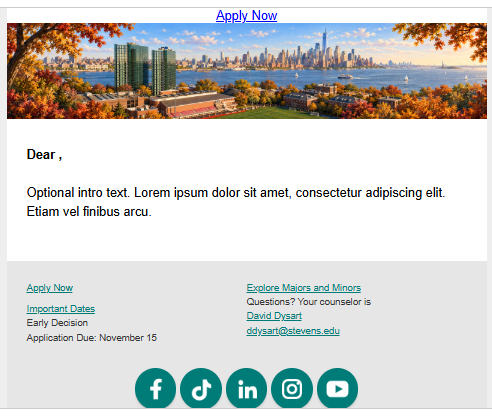
INTERNAL DEMONSTRATION
A seasonal header, application action, sample deadline, counselor contact, and supporting link in one demonstration.
View full image ↗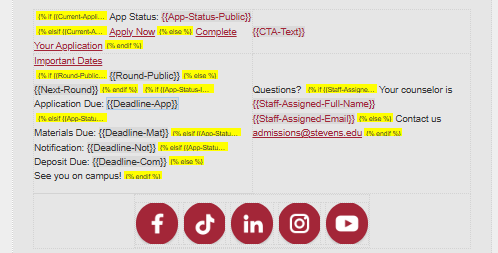
INTERNAL DEMONSTRATION
Application status, dates, counselor fallbacks, and the CTA slot in the internal template editor.
View full image ↗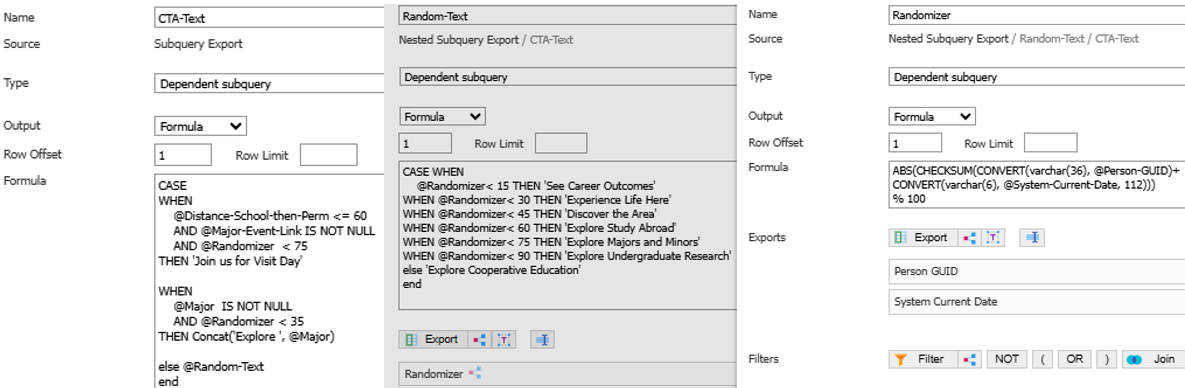
INTERNAL DEMONSTRATION
Recipient List logic combines eligibility checks, ordered thresholds, and a student-and-date value to select a supporting action.
View full image ↗HOW THE PIECES CONNECT
Configurable Joins and the Recipient List resolve the student context and CTA choice. Merge fields carry those values into the responsive HTML.
Liquid conditions handle application status and counselor fallbacks. Content Blocks will supply the maintained date and CTA content as the internal build is completed.
One shared structure keeps recurring information consistent across campaigns while leaving the message body editable.
PUT IT TO WORK
Connect the message, the student’s context, and a useful next step.