← All work

AI / ENROLLMENT ANALYSIS

Enrollmentor.

Conversational enrollment analysis

Ask enrollment questions.
Inspect the evidence.
Keep the useful answers.

Explore the screenshots

Designed and built by David Dysart.

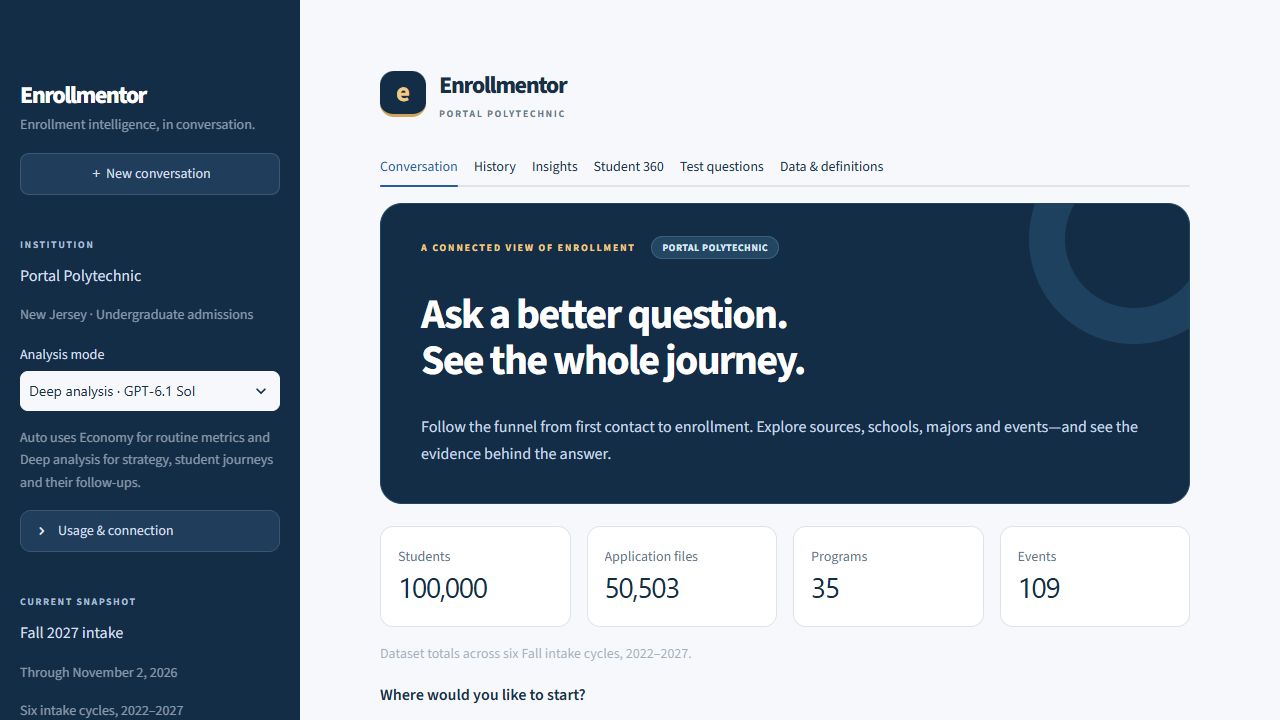
Enrollmentor’s analysis workspace with navigation, an introductory banner and totals for students, applications, programs and events.

QUESTIONS / EVIDENCE / USEFUL ANSWERS

The project

Enrollmentor brings conversational analysis to your enrollment questions. Ask about application pacing, recruitment sources, feeder schools, event attendance and funnel conversion, then refine the population or reporting date through follow-up questions.

Bounded, read-only calculation tools connect answers to evidence. Review filters, reporting cutoffs and denominators alongside tables and charts, or explore funnel segments and student journeys outside the conversation.

Save completed analyses with their original evidence. Reopen useful findings and export PDF briefs, PNG charts, CSV data and unsent email drafts.

Implementation is tailored to your institution’s data sources, reporting definitions and access requirements.

THE WORKFLOW

From a question
to something you can use.

Ask across the enrollment funnel

Compare application pacing, recruitment sources, feeder schools and event attendance through natural-language questions and follow-ups.

Inspect the evidence

Review tables, charts, reporting dates, filters and conversion denominators behind an answer.

Follow connected journeys

Explore funnel segments and student histories across school, source, application, decision and event records.

Save and reuse the analysis

Reopen saved answers and download PDF briefs, PNG charts, evidence CSVs and unsent email drafts.

DOCUMENT PREVIEW / FIRST REPORT PAGE

PDF decision brief

The downloadable brief keeps the question, answer, comparison table and reporting filters together.

Open original image

ENROLLMENTOR / THE WORKSPACE

Conversation workspace

Full resolution. Scroll to explore, or use arrow keys with the image area focused.

Enrollmentor’s analysis workspace with navigation, an introductory banner and totals for students, applications, programs and events.

The workspace and connected records at a glance.

Open original image

ENROLLMENTOR / THE WORKSPACE

Application comparison

Full resolution. Scroll to explore, or use arrow keys with the image area focused.

An Enrollmentor question and comparison table for New Jersey resident applications and distinct applicants in the Fall 2026 and Fall 2027 cycles.

A natural-language question answered with comparable application and applicant counts.

Open original image

ENROLLMENTOR / THE WORKSPACE

Application pacing chart

Full resolution. Scroll to explore, or use arrow keys with the image area focused.

Enrollmentor’s application-pacing bar chart compares Fall 2026 and Fall 2027, with the reporting date, source reference and PNG download visible.

Submitted applications compared at the same point in two recruitment cycles.

Open original image

ENROLLMENTOR / THE WORKSPACE

Funnel insights

Full resolution. Scroll to explore, or use arrow keys with the image area focused.

Enrollmentor’s conversion-rate selector above a table of inquiry-to-application numerators, denominators and percentages for geography and event-attendance groups.

Inquiry-to-application conversion by geography and pre-application event exposure.

Open original image

ENROLLMENTOR / THE WORKSPACE

Student journey

Full resolution. Scroll to explore, or use arrow keys with the image area focused.

A student profile across two fall intakes, with school, major and source rows above inquiry and event timeline entries.

School, major and source context alongside a dated student journey.

Open original image

ENROLLMENTOR / THE WORKSPACE

Saved analysis

Full resolution. Scroll to explore, or use arrow keys with the image area focused.

Enrollmentor History with a search field, a saved-question selector and buttons to ask again or continue the conversation.

Search saved analyses and choose how to continue.

Open original image

ENROLLMENTOR / THE WORKSPACE

Saved-answer downloads

Full resolution. Scroll to explore, or use arrow keys with the image area focused.

An Enrollmentor application chart above download controls for PNG, PDF, an EML email draft, HTML, plain text and evidence CSV.

Download a chart, decision brief, evidence file or unsent email draft.

Open original image

DOCUMENT PREVIEW / FIRST REPORT PAGE

PDF decision brief

Full resolution. Scroll to explore, or use arrow keys with the image area focused.

First page of an Enrollmentor PDF decision brief showing a New Jersey application question, its answer, a comparison table and reporting filters.

The downloadable brief keeps the question, answer, comparison table and reporting filters together.

Open original image

PUT IT TO WORK

What would you
like to understand?

Start with the enrollment questions your team needs to answer.

Start a conversation